

ddc-gui#
Lightweight system tray brightness controller for external monitors on Linux using DDC/CI.
Most Linux desktop environments lack a simple and reliable way to control external monitor brightness via DDC/CI. This project aims to provide a minimal, fast, and native-feeling solution.
✨ Features#
- Tray (AppIndicator) integration
- Quick brightness presets
- Precision control with popup slider
- Minimal and lightweight (GTK3 based)
- Works with
ddcutil
📸 Screenshots#
| Preset Menu | Slider |
|---|---|
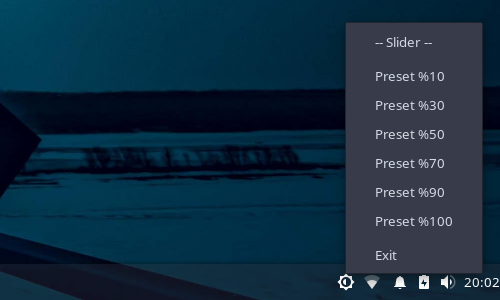 | 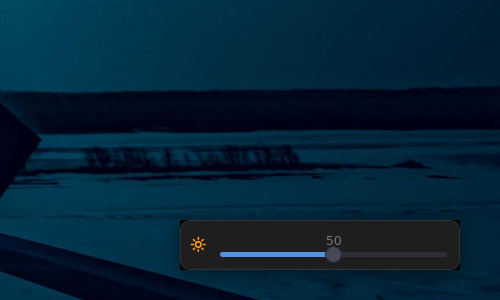 |
⚙️ Requirements#
- Linux (X11)
ddcutil- Python 3
- GTK 3 bindings (
python3-gi) libayatana-appindicator3
Install dependencies (Debian/Ubuntu)#
sudo apt install ddcutil python3-gi gir1.2-gtk-3.0 gir1.2-ayatanaappindicator3-0.1🚀 Usage#
Before running, verify your monitor is detected:
ddcutil detectpython3 main.py🔄 Autostart#
To start the application automatically on login, create a .desktop entry:
mkdir -p ~/.config/autostart
nano ~/.config/autostart/ddc-gui.desktop
Paste the following:
[Desktop Entry]
Type=Application
Name=ddc-gui
Exec=python3 /full/path/to/main.py
Icon=display-brightness-symbolic
Terminal=false
X-GNOME-Autostart-enabled=true
Replace
/full/path/to/main.pywith the actual path to your project.
Alternative (Recommended)#
If you install the app system-wide, you can simplify:
Exec=/usr/bin/python3 /full/path/to/main.pyNotes#
Make sure the script is executable:
chmod +x main.pySome desktop environments may require logout/login after setup.
Make sure your user has permission to access I2C devices (usually by being in the
i2cgroup).
⚠️ Known Issues#
- Bus ID is currently hardcoded
- Brightness is not synced on startup
- Limited multi-monitor support
- Error handling is minimal
🗺️ Roadmap#
- Auto-detect monitor (DDC bus)
- Sync current brightness on startup
- Multi-monitor support
- Config file support
- Packaging (.deb)
- Improved error handling
📜 License#
🤝 Contributing#
Contributions, issues and suggestions are welcome.